Logbook for reviewers
You review hours for a program. Someone sent their hours with Logbook, and you got a review link, usually in your program’s Airtable. This guide shows you how to read that link and decide, quickly and fairly.
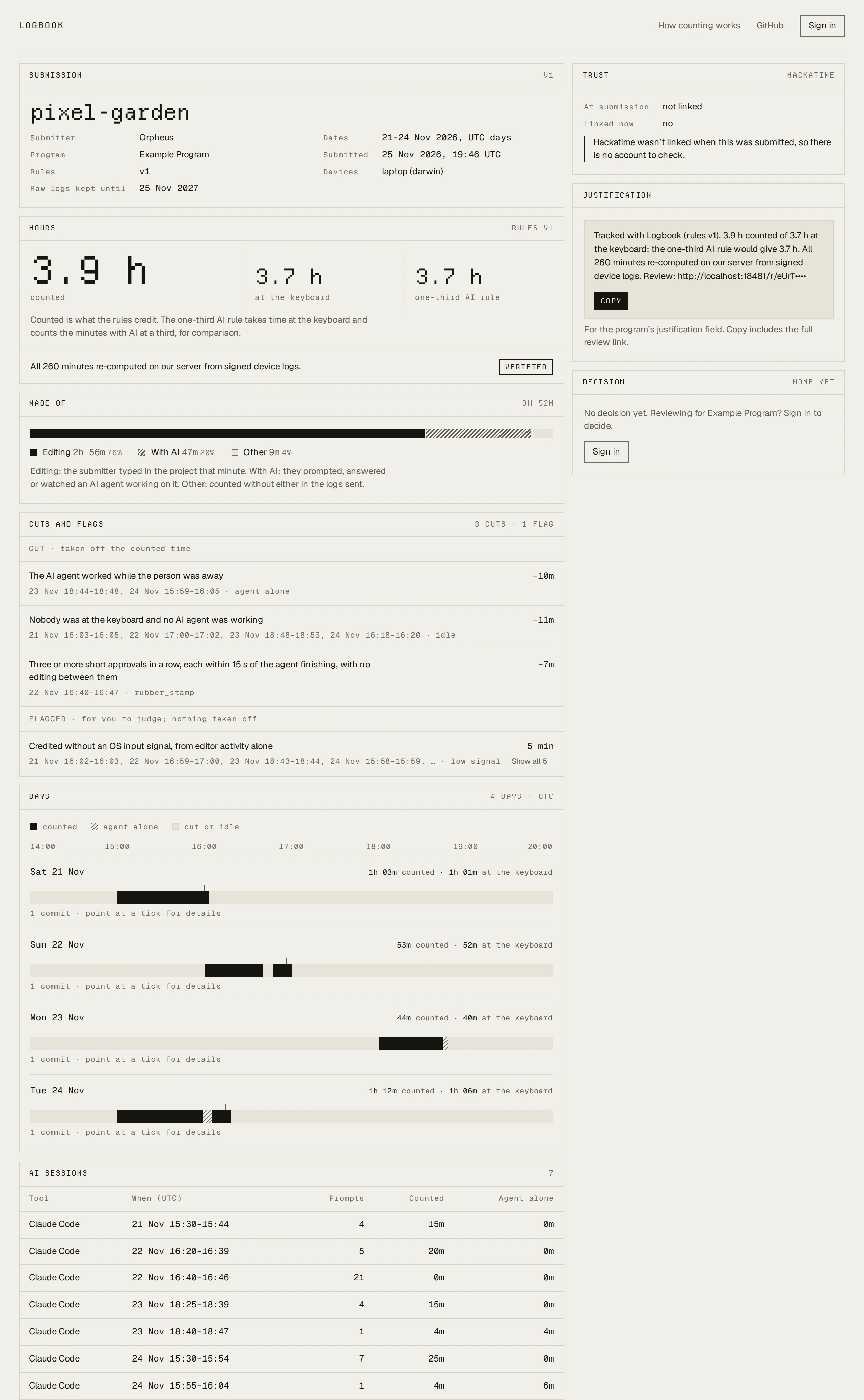
What the review page gives you
Section titled “What the review page gives you”One page per submission, with everything you need on it:
- The hours. Counted hours, time at the keyboard, and what the one-third AI rule would give, side by side.
- The evidence. Whether Logbook’s server could recount every minute from logs the submitter’s computer signed on the day.
- Where time was taken off, and why. Each cut and flag, with its rule in plain words and when it happened.
- Every day, minute by minute. A strip for each day, with commits marked on it, and a table of AI sessions.
- Trust. The submitter’s Hackatime trust level when they submitted and now.
- A paragraph for Airtable, with a copy button.
- Your decision. Approve, adjust or reject, if you’re a member of the program.
You don’t need to open any other tool to judge a submission.
The usual path
Section titled “The usual path”- Open the review link. Reading needs no account. Deciding needs you to sign in and be a reviewer for the program.
- Read the hours, and the cuts and flags under them.
- Check the evidence and trust.
- Look at the days and AI sessions when something needs a closer look.
- Decide: approve, adjust or reject.
- Paste the justification into Airtable.
If you review a lot of submissions, work from your inbox instead of single links.
A note on what Logbook decides
Section titled “A note on what Logbook decides”Logbook counts and explains. It doesn’t approve anything. Your program’s rules decide what gets approved, and you apply them. Logbook gives you the numbers and the reasons behind them.
Open a review linkOpen the page and get ready to decide.
Common questionsShort answers for reviewers.
Running the program, not just reviewing? See I run a program. Curious how teens send their hours? See Submit your hours.