Your inbox
If you review for a program, you don’t have to wait for links. Every submission sent to your program lands in its inbox on Logbook.
Open the inbox
Section titled “Open the inbox”-
Sign in at logbook.boogles.dev with Hack Club.
-
Open Apps from the tabs at the top (it’s also in your account menu). You see each program you own or review for, with how many submissions wait for review, such as “3 to review” or “nothing to review”.
-
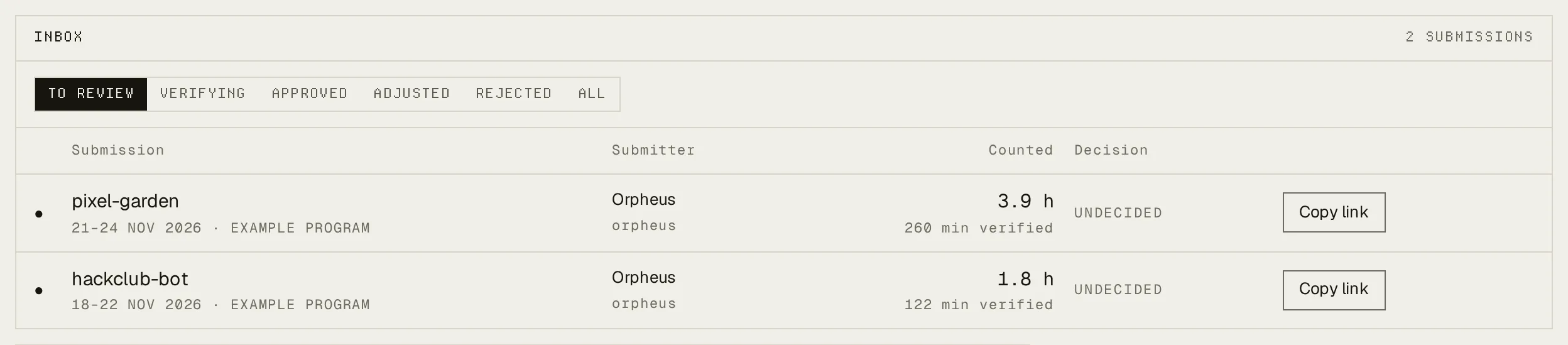
Open your program. Its INBOX lists the submissions. On a phone, reviewers get the inbox first.
Read a row
Section titled “Read a row”Each row shows, from left to right:
- a status mark:
●ready,○verifying,✕failed,—withdrawn; - the project, with its dates and program under it;
- the submitter;
- counted hours, with the evidence under them, such as “2,431 min verified” or “2 differ · 1,234 unbacked”;
- the decision as a small stamp, or a word such as UNDECIDED or VERIFYING;
- Copy link, which copies the review link.
Press a row to open its review page.
Filter the list
Section titled “Filter the list”The buttons at the top pick what to show:
| Filter | Shows |
|---|---|
| To review | Checked by Logbook and waiting for a decision. This is the default. |
| Verifying | Still being recounted. Nothing to decide yet. |
| Approved, Adjusted, Rejected | Decided, by that decision. |
| All | Everything, including failed and withdrawn submissions. |
The list shows 100 at a time, newest first. Press Show 100 more for older ones.
Work through it
Section titled “Work through it”- Choose To review.
- Open the first row, read it and decide.
- Go back to the inbox. The submission you decided has left To review.
How to tell it worked
Section titled “How to tell it worked”When everything is decided, To review says ( NOTHING TO REVIEW ), and the Apps list shows “nothing to review” for your program.
Not seeing your program?
Section titled “Not seeing your program?”The Apps list shows only programs whose owner has added your Logbook username as a reviewer. Ask the owner to add you. Owners: see Add reviewers.