Read the hours
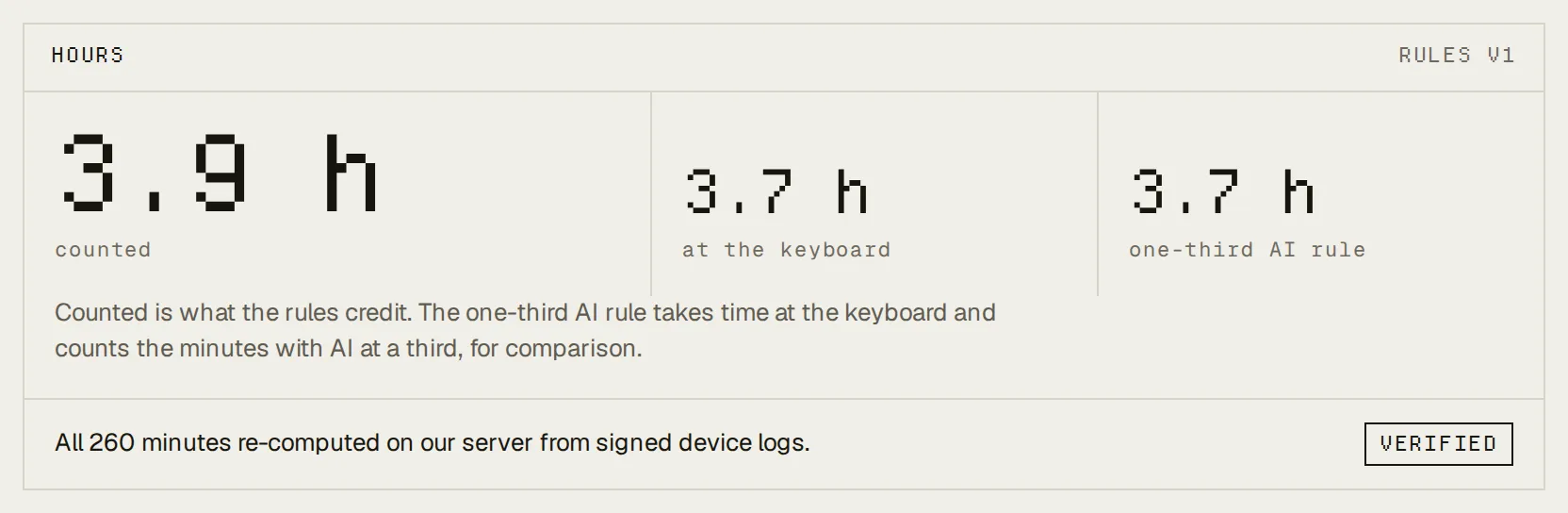
The HOURS panel is the first thing to read. It gives three figures for the same project and the same days, in hours with one decimal, like your program’s records.
The three figures
Section titled “The three figures”Counted is the number Logbook stands behind. It’s the time the submitter was actually present and working, after Logbook removed what clearly wasn’t effort: idle time, time an AI agent worked while they were away, and a few patterns described below. This is the number you approve or adjust.
At the keyboard is raw editor time, measured the way Hackatime measures it, from editor plugin heartbeats. It’s what the submitter would have claimed with Hackatime.
One-third AI rule takes the time at the keyboard and counts the time editor plugins marked as AI coding at a third. It’s there so you can compare Logbook’s number with the flat rule many programs use today.
The panel’s header shows the rules version, such as rules v1. The rules are public: see What counts.
Reading them together
Section titled “Reading them together”- Counted is well below at the keyboard. Logbook took a lot off. Look at CUTS AND FLAGS to see what and when.
- Counted is close to at the keyboard. The submitter was present for nearly all their editor time.
- Counted is above at the keyboard. This can happen. Logbook credits time spent prompting and watching an AI agent in a terminal or AI app, which editor plugins don’t record as keyboard time.
- Counted is below the one-third AI rule. Logbook is stricter than the flat rule for this submission.
MADE OF
Section titled “MADE OF”Under the hours, a bar splits counted time into three parts:
- Editing: the submitter typed in the project’s files that minute.
- With AI: they sent a prompt, answered an AI tool’s question, or watched an agent work on the project.
- Other: counted, but with neither in the logs sent, such as reading, testing or terminal work.
This split is for understanding only. It never changes how much is counted.
CUTS AND FLAGS
Section titled “CUTS AND FLAGS”This panel reads like an invoice. Each line is a rule in plain words, the time it affects on the right, and when it happened underneath, as UTC time ranges. Long lists show the first few ranges and a Show all button. The short code at the end of each line (such as agent_alone) is the rule’s name in the public rules.
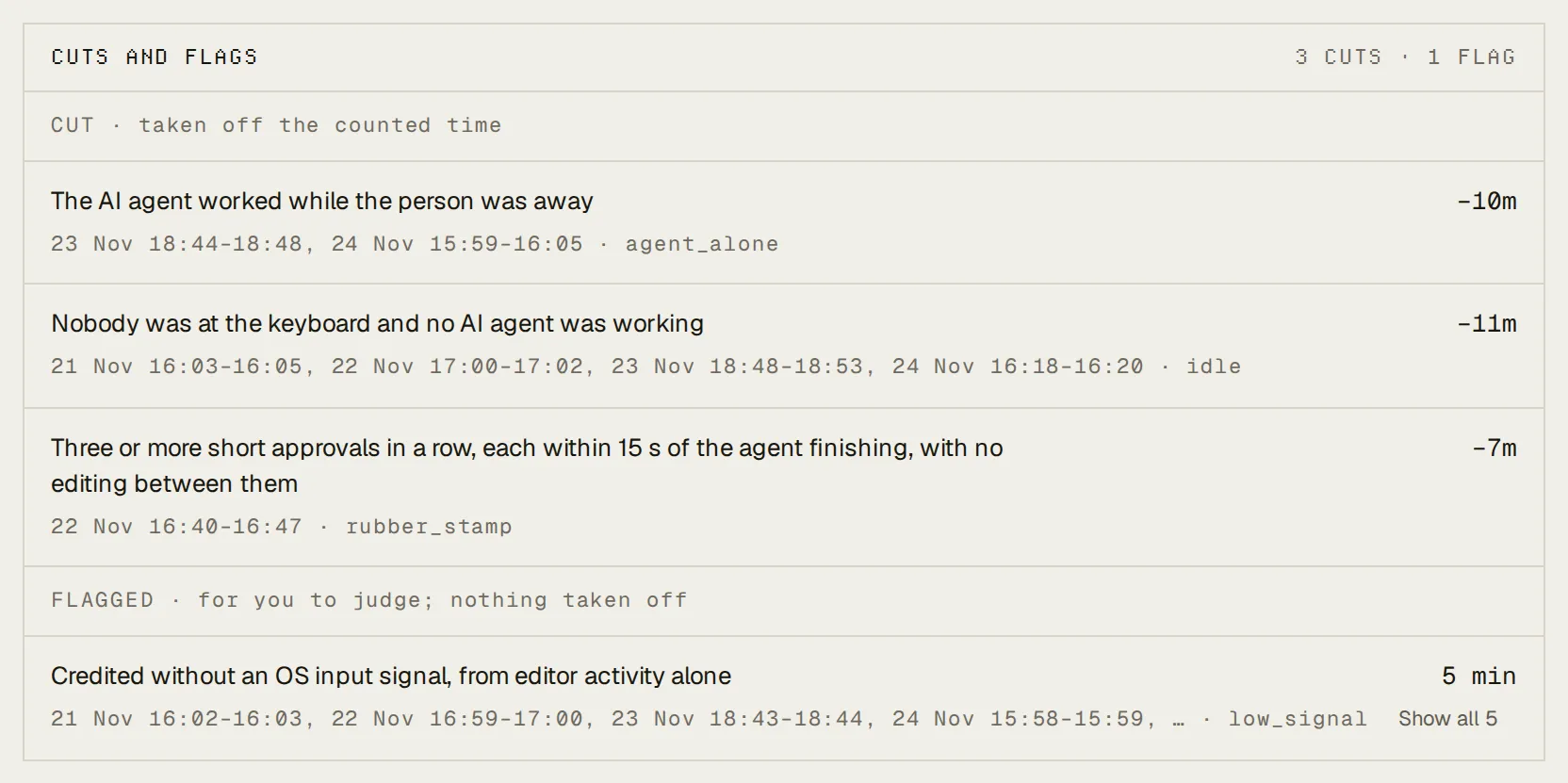
Cuts were taken off the counted time. They’re already out of the counted figure.
| Code | What it means |
|---|---|
idle |
Nobody was at the keyboard and no AI agent was working. |
agent_alone |
The AI agent worked while the person was away. |
rubber_stamp |
Three or more short approvals in a row (“yes”, “continue”), each within 15 s of the agent finishing, with no editing between them. |
loop |
The same prompt sent three or more times within 30 minutes with no editing between them. |
background_editor |
Editor heartbeats with no writing or cursor movement for over 5 minutes, on a device with no input signal. |
Flags took nothing off. They point you at minutes worth a look.
| Code | What it means |
|---|---|
scripted_input |
Input or heartbeat timing too regular for a person. |
automated_session |
AI turns started with no input at the keyboard before them, such as scheduled or scripted runs. |
otel_mismatch |
Claude Code measured far less active time than the minutes credited in its sessions. |
long_day |
More than 12 credited hours in one day, in the submitter’s own time zone. |
low_signal |
Credited without an operating system input signal, from editor activity alone. |
multi_device |
Time credited on two or more devices in the same minute. |
“Nothing was cut or flagged” means every minute of active time was counted.
Check whether the minutes were verified, and the submitter’s trust level.